
Quick answer: every template on this page is free, print-ready, and USPS-compliant — the same certified production templates our plant runs on. Each size comes two ways: print-only (a clean canvas with trim, bleed, and safe zones) and full-service (front and back files with the EDDM indicia and "Local Postal Customer" panel already placed, so your mailer can't get rejected over the panel). Download the EPS files below, design inside the guides, and send the file back to us for a free preflight.
Last updated: July 2026. Templates match the layouts in the EDDM design guidelines.
Download the Templates
Each complete kit is a ZIP with all files for that size. Individual files: print-only EPS, and full-service front + back EPS.
| Size | Best for | Print-only | Full-service (front / back) | Complete kit |
|---|---|---|---|---|
| 6.5" × 9" | The classic EDDM postcard — best cost-to-impact ratio | EPS | Front / Back | ZIP |
| 6.25" × 9" | Slightly trimmer take on the classic | EPS | Front / Back | ZIP |
| 6" × 12" | Panoramic format — menus, before/after photos | EPS | Front / Back | ZIP |
| 6.5" × 12" | Oversized postcard — big canvas, same flat postage | EPS | Front / Back | ZIP |
| 8.5" × 11" | The biggest thing in the mailbox that day | EPS | Front / Back | ZIP |
| 4.25" × 11" | Slim tall format — rate cards, event promos | EPS | Front / Back | ZIP |
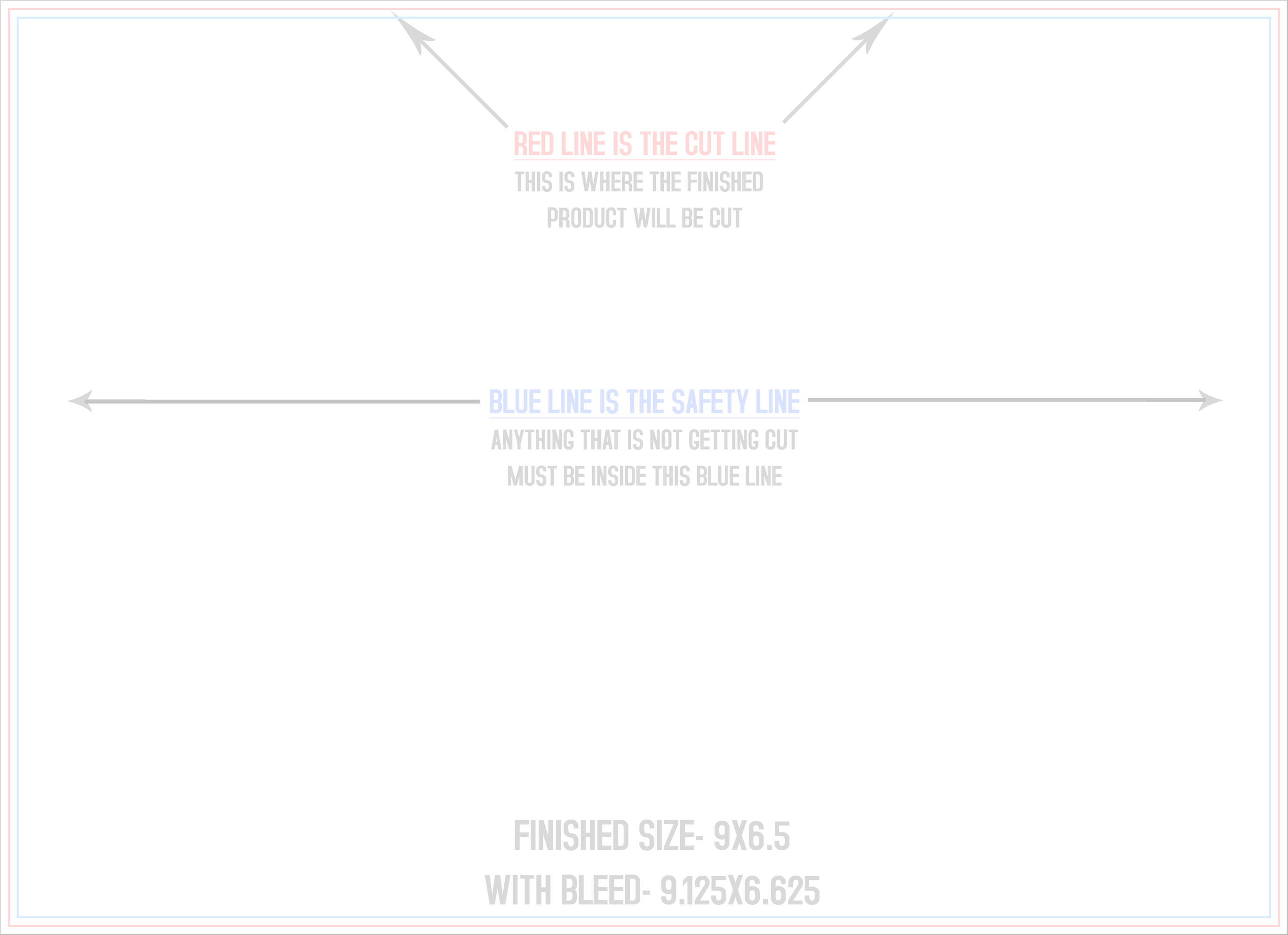
What's Inside Every File
- Trim line — the finished size after cutting.
- 1/8" bleed — extend background color and images to this line so no white slivers show at the edge.
- Safe zone — keep text and logos inside it (1/4" from trim).
- Full-service files only: the five-line EDDM indicia and the "Local Postal Customer" address block, pre-placed on the top half of the address side exactly where USPS rules require. Design around the panel — don't move it.
Print-Only or Full-Service — Which Do You Grab?
Full-service front + back is the right choice for almost everyone: it's the version we print and mail for you, and the mailing panel is already compliant. Grab print-only if you're handling the mailing panel yourself or running a non-EDDM job at the same size. Not sure which program you're in? Read EDDM Retail vs. BMEU — or skip the decision and let us run the whole mailing.
Which Size Should You Pick?
Every size above rides at the same flat EDDM postage — so the choice is about impact and print cost, not postage. The 6.5" × 9" is the workhorse; the 8.5" × 11" wins when you need room for a menu or coupon block. The full logic is in EDDM size requirements and the direct mail cost guide.
How to Use the Templates
- Download the kit for your size and open the EPS in Illustrator, Photoshop, Affinity, or InDesign.
- Design to the bleed line; keep text in the safe zone; leave the indicia panel where it sits.
- Export a print-ready PDF (CMYK, 300 DPI, bleed included).
- Send us the file — every EDDM file gets a free preflight check before anything prints.
Template FAQ
Are these templates really free?
Yes — no email gate, no watermark. They're the same certified templates our production runs on; files built on them go straight through preflight with no rework.
What format are the files?
Layered EPS — opens in Illustrator, Photoshop, InDesign, and Affinity. Each kit ZIP also includes a JPG proof of the layout. Need a different format for your workflow? Ask us — Photoshop PSD versions are available.
I use Canva — can I still use these?
Canva can't open EPS, but the fix is easy: set your Canva canvas to the same finished size plus 1/4" (for bleed), keep everything important 1/4" inside the edge, and leave the top half of the back clear for the mailing panel. Send us the export and we'll place the indicia and check compliance free.
Why do full-service templates have separate front and back files?
The back (address side) carries the fixed indicia and address panel, so it ships as its own file to keep the panel locked in place. Design both, export both, send both.
Can you just design it for me?
Daily. Our team designs EDDM pieces on these exact templates and knows the response-side rules cold. Design is quoted alongside printing so you decide with numbers.
Design It, Then Let Us Mail It
Download your template, build the piece, and send us the file for a free preflight — or start an EDDM quote and we'll print, bundle, handle the USPS paperwork, and get it in-home. Full program details: full-service EDDM. Questions? (713) 882-4629.